
Technical References
Introduction to the API
MOVA provides a REST-based programming interface, and communication with the Integration HUB happens through this interface.
Communication with our systems uses the following URLs:
- Production:
https://api3.mova.vc/v1/hub/ - Staging:
https://api3-staging.mova.vc/v1/hub
Communication with JSON
Communication with MOVA's APIs uses JSON (JavaScript Object Notation), a lightweight format that is easy to read.
Advantages
- Easy to convert JSON to objects and vice versa.
- Easier to read.
- Widely used in the market.
Errors
Some failures may happen during integration with the APIs. Below are the possible errors, their status codes, and how to fix them.
Possible errors
| Status Code | Error | Reason |
|---|---|---|
| 401 | Unauthorized | The API Key is not authorized to consume one or more APIs |
| 403 | Forbidden | The mova-client-id does not have access to the given product |
| 404 | Not Found | The Proxy did not find the requested route, or a unique identifier was not found in the database |
| 405 | Method Not Allowed | The method used (GET/POST/PUT/Other) is not allowed |
| 406 | Not Acceptable | The method used (GET/POST/PUT/Other) is not accepted |
| 422 | Unprocessable Entity | A field sent is invalid and/or not accepted |
| 429 | Too Many Requests | More requests were made than allowed |
| 500 | Internal Server Error | The Proxy/Server did not know how to handle the situation |
| 503 | Service Unavailable | The Proxy/Server is temporarily unavailable |
| 504 | Timeout | The waiting time was exceeded |
How to fix
| Status Code | What to do |
|---|---|
| 401 | Make sure you are integrating with the correct route: check the URL, Host, API version, and endpoint. Also check that the header contains the x-api-key key with your key. If all of this is correct, contact MOVA. |
| 403 | Make sure you are accessing the correct product: check the product_id. Also check that the mova-client-id has access to the desired product and is sent in the header with the correct key and value. If all of this is correct, contact MOVA. |
| 404 | Make sure you are accessing the correct route. |
| 405 | Make sure you are using the correct method for the route (GET/POST or PUT). Also check that the API Key is sent correctly and is valid. If all of this is correct, contact MOVA. |
| 406 | Change the method to an allowed method (GET/POST or PUT). |
| 422 | Make sure the request body is sent correctly; validate it against the documentation. |
| 429 | Wait a few minutes before making new requests. If the error persists, contact MOVA. |
| 500/503/504 | Wait a few minutes before making new requests. If the error persists, contact MOVA. |
Authentication
API Key authentication
To communicate successfully with the APIs, an authentication step is required.
How to get one?
The key is provided by MOVA. To get a key, contact support with:
- The APIs you will use
- The environment (Staging or Production)
- Requesting user data (name and email)
- Requesting company data (legal name and CNPJ)
How to use it?
Authentication is done through a request header field: x-apikey with the key provided by MOVA.
Example:
curl -X POST https://api3.mova.vc/v1/hub/exemplo \
  -H "Content-Type: application/json" \
  -H "x-apikey: YOUR_API_KEY_HERE" \
  -d '{ ... }'
Client identification (mova-client-id)
To communicate successfully with the APIs, an identification step is required.
How to get one?
The key is generated for the client during onboarding, so no request is needed.
How to use it?
Identification is done through a request header field: mova-client-id with the key provided by MOVA.
Example:
curl -X POST https://api3.mova.vc/v1/hub/exemplo \
  -H "Content-Type: application/json" \
  -H "x-apikey: YOUR_API_KEY_HERE" \
  -H "mova-client-id: YOUR_CLIENT_ID_HERE" \
  -d '{ ... }'
Requests
Synchronous request
One way to communicate with MOVA's APIs is through synchronous requests, where the response comes back at the same moment the request is made.
How does it work?
Synchronous calls consist of a request (call) and its response. For example, when requesting a simulation, you make a call, wait for a while, and then receive the response to that request, either successful or with an error.
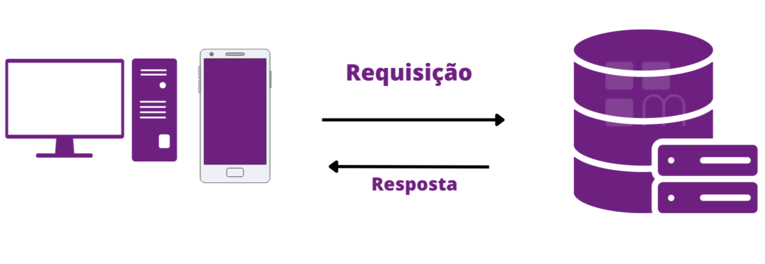
Some endpoints default to asynchronous requests unless the client indicates that it wants to use synchronous mode. This is sent in the request header through the sync field. If the value of sync is true, the request will be synchronous.
Example:
curl -X POST https://api3.mova.vc/v1/hub/exemplo \
  -H "Content-Type: application/json" \
  -H "x-apikey: YOUR_API_KEY_HERE" \
  -H "mova-client-id: YOUR_CLIENT_ID_HERE" \
  -H "sync: true" \
  -d '{ ... }'
Asynchronous request
Another way to communicate with MOVA's APIs is through asynchronous requests, where the expected response may come later and is received through webhooks.
How does it work?
Instead of a synchronous call (where you get the response "right away"), with an asynchronous request you ask for some processing to be done (such as requesting a quotation), and once it is complete, MOVA will call the URL you provided with the data.
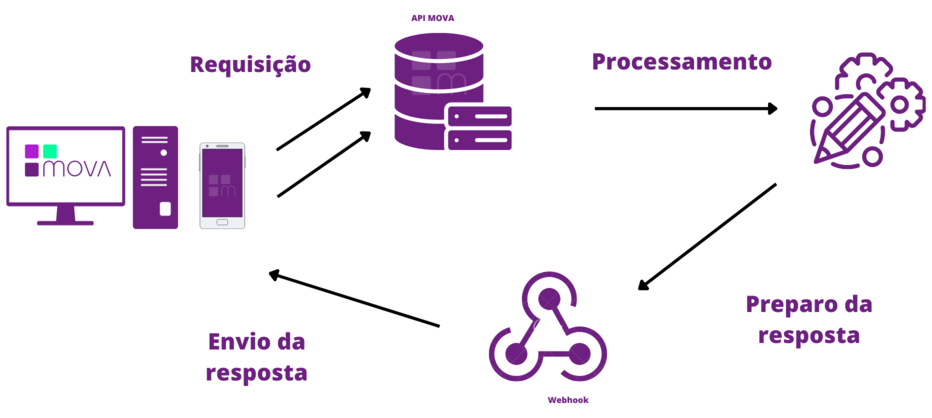
Some endpoints default to asynchronous requests. This is sent in the request header through the sync field. If the value of sync is false, the request will be asynchronous.
Request example:
curl -X POST https://api3.mova.vc/v1/hub/exemplo \
  -H "Content-Type: application/json" \
  -H "x-apikey: YOUR_API_KEY_HERE" \
  -H "mova-client-id: YOUR_CLIENT_ID_HERE" \
  -H "sync: false" \
  -d '{ ... }'
Asynchronous response example (webhook):
{
  "api_version": "1.1.0",
  "transaction_id": "707xaf60-1d8c-481d-910b-8cbe1f00a57e",
  "data": {
    "general_info": {
      "response_type": "RETORNO_NEGOCIACAO_ATUALIZADA"
    },
    "borrower_info": {
      "cpf_cnpj": "12345678999",
      "name": "João Silva"
    },
    "proposal_info": [
      {
        "proposal_status": "INADIMPLENTE",
        "operation_tracking_id": "bjx837f2-d746-41fc-fd23-6d72b93d0385",
        "proposal_id": 124451,
        "product_id": 593,
        "registration_info": [
          {
            "contract_id": "C18663W15031S12441",
            "investment_amount": 2591.35,
            "investor_id": "12345678999"
          }
        ]
      }
    ],
    "general_installments_info": {
      "installments_number": 1,
      "sum_installments_principal_amount": 1036.36,
      "sum_installments_interest_amount": 27.98,
      "sum_installments_amount": 1064.35,
      "sum_installments_updated_amount": 2406.74
    },
    "individual_installments_info": [
      {
        "proposal_id": 124451,
        "installment_id": 5629033,
        "installment_status": "INADIMPLENTE",
        "installment_number": 3,
        "installment_due_date": "2022-07-01",
        "installment_principal_amount": 1036.36,
        "installment_interest_amount": 27.98,
        "installment_base_amount": 1064.35,
        "installment_updated_amount": 2406.74
      }
    ]
  }
}
The expected responses will be delivered later through a webhook that calls the partner's URL, which must be registered in advance. See the Webhooks section below.
Webhooks
A way for systems to communicate asynchronously and passively. The requester does not need to wait, in the same call, for the requested data or the result of an operation. You receive a call as soon as an event happens — for example, you requested a quotation and then received that quotation's data via webhook.
Advantages
- Real-time operation
- Lower cost (no polling required)
- Faster communication between systems
How to register
To configure the endpoints, provide the following during onboarding:
- Address (URL)
- Authentication method:
- API Key — if this option is chosen, also provide the HTTP method/verb used to authenticate.
- OAuth 2.0
- Payload:
- MOVA standard
- Custom
Available webhooks
Quotation
Status:
Document:
Payment
Installment:
- Updated
- Settled (payment)
- Settled (renegotiation)
- Overdue
- Consolidated contract (renegotiation)
- Processing error
Proposal
Status:
Disbursement:
- Automatic disbursement
- Automatic disbursement error
- Batch automatic disbursement
- Batch automatic disbursement error
Receivables: